
Introduction
To recap the series so far, we've gone from looking at the high level purposes and intentions of a Command and Control Server (C2) in general to designing and implementing our first iteration of our implant and server. If you've been following along, you might think you've written a C2...
This is a common mindset. In our experience, getting to this point does not require much sophistication. All of our previous work could easily be achieved (and has been achieved!) using C#, Python, Go, in an evening's worth of frenetic caffeine-fuelled typing. Leading features of C2s can often be linked to pretty old solved concepts and patterns from software engineering, such as thread management, handling idle processes, and ensuring correction execution and program flow.
But as we found when writing our various C2s, and as numerous other offensive developers have found when writing their own implants and servers, once you have the code working and you can get a pingback, you stop running your implant on your development computer and try it on a second computer. This is where the questions start creeping in. Questions like "Why can't I access remote files?", "Why can I make outbound requests over this protocol, but not this?", "Why does this command just fail with no explanation", and for the cynical self-doubter with enough imposter syndrome "Why isn't Defender stopping me from doing this?".
This, personally, is the post we were looking forward to writing. It's going to be a discussion, with a few examples, of increasing common behaviours within environments with active endpoint protection. In 2022, implants face far more scrutiny - the implant and C2 operator must to be prepared to face or evade this scrutiny, and the defender must be aware of how it works so that it can be used to the best of its ability.
Whilst writing this, we also want to clear up the 'it avoids <insert company here> EDR' tweets. Just because the implant is able to execute, doesn't mean that Endpoint Protection is blind to it - it can mean that, but we want to demonstrate some techniques these solutions use to identify malicious behaviour and raise the suspicion of an implant.
In a nutshell, proof of execution is not proof of evasion.
Objectives
This post will cover:
- Setting up The Hunting ELK
- Reviewing three ways EDRs can detect or block malicious execution:
- Kernel Callbacks
- Hooking
- Thread Call Stacks
By the end of this post, we will have covered how modern EDRs can protect against malicious implants, and how these protections can be bypassed. We will move from having an implant which technically works to an awareness of how to write an implant which actually starts to work, and can achieve the goals of an operator.
As we've said many times, we are not creating an operational C2. The output from this series is poorly written and riddled with flaws - it only does enough to act as a broken proof-of-concept of the specific items we discuss in this series to avoid this code from being used by bad actors. For this same reason, we are trying to avoid discussing Red Team operational tactics in this series. However, as we go on, it will become obvious why blending in with the compromised users typical behaviour will work. This is something that xpn has discussed on Twitter:
Find Confluence, read Confluence.. become the employee!
If your implant has been flagged by EDR, querying NetSessionEnum on every AD-joined computer to find active sessions is probably not typical user behaviour. You likely will not know your implant has been flagged until it stops responding. From here, it's a race until your implant is uploaded to VirusTotal and you have to go back to the drawing board.
Tools We'll Be Using
We will be referring to the following programs a lot during this blog:
The Hunting ELK (HELK)
HELK is an Elastic stack best summarised by themselves:
The Hunting ELK or simply the HELK is one of the first open source hunt platforms with advanced analytics capabilities such as SQL declarative language, graphing, structured streaming, and even machine learning via Jupyter notebooks and Apache Spark over an ELK stack.
This project was developed primarily for research, but due to its flexible design and core components, it can be deployed in larger environments with the right configurations and scalable infrastructure.
PreEmpt
A pseudo-EDR which has the capability to digest EtwTi, memory scanners, hooks, and so on. Although, this is not public but code will be shared when necessary.
These two tools will allow us to generate proof-of-concept data when required.
Important Concepts
Similar to Maelstrom: Writing a C2 Implant, we want to have a section dedicated to clearing up some topics we feel need some background before moving on.
What do we mean by Endpoint Detection and Response
Endpoint Detection and Response (EDR) software goes by a number of different acronyms, and there may well be distinctions between different companies programs and their functionality. For the sake of simplicity, we are call all programs that are limited to scanning files on disk statically "anti-virus", and all programs that go further and scan device memory, look at the behaviour of programs while they are running, and responding to threats as they happen "EDR"s. These may be called various names, including XDR, MDR, or just plain AV.
Throughout this series, as we have done so far, we will be sticking with "EDR".
A good overview of this is CrowdStrike's post "What is Endpoint Detection and Response (EDR)":
Endpoint Detection and Response (EDR), also referred to as endpoint detection and threat response (EDTR), is an endpoint security solution that continuously monitors end-user devices to detect and respond to cyber threats like ransomware and malware.
Coined by Gartner's Anton Chuvakin, EDR is defined as a solution that "records and stores endpoint-system-level behaviors, uses various data analytics techniques to detect suspicious system behavior, provides contextual information, blocks malicious activity, and provides remediation suggestions to restore affected systems."
Because it's relevant to this post, the next section will look at EDR architecture and comparing EDR behaviours across the various vendors. Without going hugely off-topic, we won't look at a number of also relevant areas, such as how Anti-Virus works, how disk-based protection may work to also stymie your implant execution (if you're still running on disk), and how AV and EDR actually goes about scanning files and their behaviours while they are doing so. Turns out, that's like, a whole field of study.
Common EDR Architecture
When discussing endpoint protection, it may help to be somewhat familiar with their architecture. The Symantec EDR Architecture looks something like this:
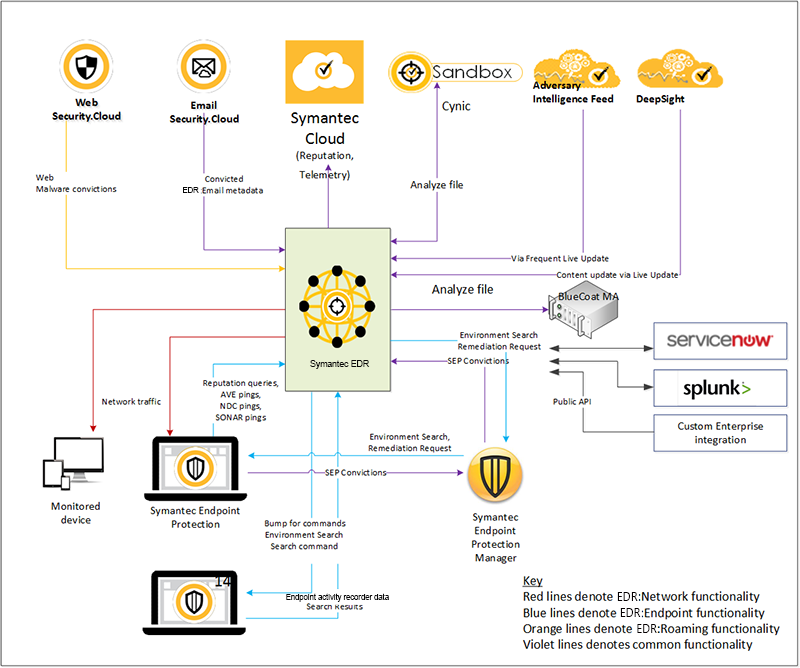
A similar approach can be seen for Defender for Endpoint. Essentially, a device with the product installed will have an agent which can consist of several drivers and processes, which gather telemetry from various aspects of the machine. Through this post and the next, we will go over a few of those.
As an aside, in a Windows environment, Microsoft inherently have an edge here. While this is currently aimed at "Large Enterprise" customers (or at least, we assume, given their price point for Azure!), Microsoft's Defender and new Defender MDE can both access Microsoft's knowledge of ... their own operating system, but also influence the development of new operating system functionality. Long-term, it wouldn't be a surprise to see Microsoft Defender MDE impact the EDR market in a similar way that Microsoft Defender impacted the anti-virus market.
The general gist of all EDR is that telemetry from the agent is sent to the cloud where it's run through various sandboxes and other test devices, and its behaviour can be further analysed by machine and human operators.
For the excessively curious reader, the following links go in to more detail about specific vendor approaches to EDR architecture:
- EDR Architecture (Bitdefender)
- EDR Security | Move Beyond Traditional Endpoint Detection and Response (paloalto Networks)
- Symantec EDR architecture (Symantec)
- Onboarding using Microsoft Endpoint Manager (Microsoft)
Briefly Reviewing and Comparing EDR Behaviour at a High Level
Without going hugely off-topic, just as how not every red team assessment is a red team, not every EDR is an EDR.
The following "Gartner Magic Quadrant", from Gartner's May 2021 Report roughly maps out the EDR landscape. It's worth noting that CrowdStrike's hire of Alex Ionescu (a maintainer for the Kernel in ReactOS) demonstrates that the current best-in-class EDR's heavily leverage knowledge of internal Windows functionality to maximise their performance:

With so much of EDR functionality relying on implementing the methods we will discuss here such as custom-written direct behaviours like kernel callbacks and hooking, being able to quickly implement new Microsoft Windows features and develop your own custom ways of reliably interacting with and interrupting malicious processes seems to be the distinguishing feature of a modern EDR from its peers.
Another metric that EDR Vendors tend to use, especially because the reports are made so public, is the Mitre Engenuity. The Attack Evaluations is described as thus:
The MITRE Engenuity ATT&CK® Evaluations (Evals) program brings together product and service providers with MITRE experts to collaborate in evaluating security solutions. The Evals process applies a systematic methodology using a threat-informed purple teaming approach to capture critical context around a solution's ability to detect or protect against known adversary behavior as defined by the ATT&CK knowledge base. Results from each evaluation are thoroughly documented and openly published.
For example, with SentinelOne, their results can be seen in: SentinelOne Overview. The overview goes through APT scenarios and marks whether or not the technique was detected and can be used as a tracker for its "effectiveness". However, some have expressed feelings online that this is not a thorough way to determine the effectiveness of the product.
When looking at EDRs from a purchasing perspective, there are a few methods of determining effectiveness and we wanted to briefly highlight them here. The main thing to consider is that some vendors do not necessarily provide more functionality than an anti-virus. As with any product, ensure that you purchase the right solution for your businesses needs.
User-land and Kernel-land
When discussing the kernel and user-land model, the following architectural image familiar to any Computer Science graduate will be used:
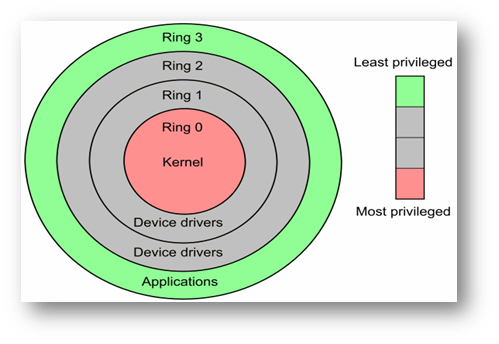
A big majority of user activity will occur at ring 3, User Mode, surprisingly the Kernel operates within Kernel Mode.
For more information on this, see Windows Programming/User Mode vs Kernel Mode. A worthwhile note is that cross-over between user mode and kernel mode can and does happen. The following definitions from the previous link summarise the differences between these layers:
- Ring 0 (also known as kernel mode) has full access to every resource. It is the mode in which the Windows kernel runs.
- Rings 1 and 2 can be customized with levels of access but are generally unused unless there are virtual machines running.
- Ring 3 (also known as user mode) has restricted access to resources.
Again, to save this post from being longer than it already is, see the Overview of Windows Components documentation for more detail on the following diagram. However, its simply showing the Windows architecture from processes, services, etc, crossing over to the Kernel. We will cover more on this shortly.
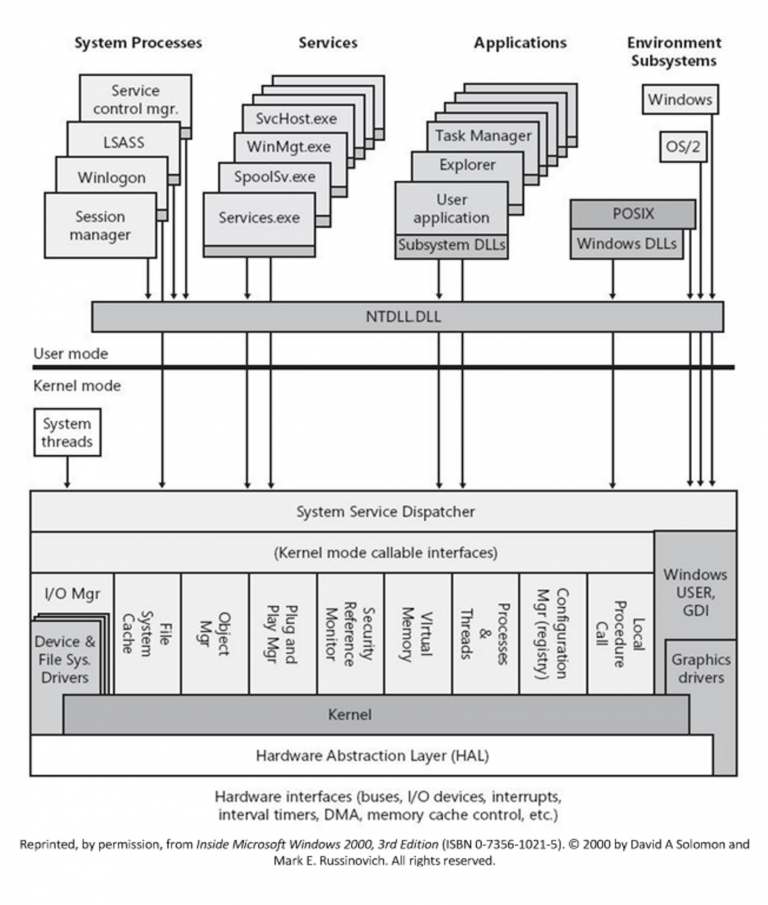
Applications that use the WinAPI will traverse through to the Native API (NTAPI) which operates within Kernel Mode.
As an example, API Monitor can be used to look at the calls being executed:

The above shows CreateThread being called and then, subsequently, NtCreateThreadEx being called shortly after.
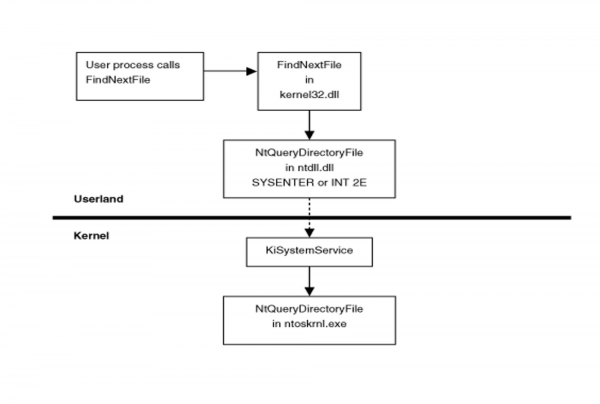
When a function within KERNEL32.DLL is called, for example CreateThread, it will make a subsequent call to the NTAPI equivalent in NTDLL.DLL. For example, CreateThread calls NtCreateThreadEx. This function will then fill RAX register with the System Service Number (SSN). Finally, NTDLL.dll will then issue a SYSENTER instruction. This will then cause the processor to switch to kernel mode, and jumps to a predefined function, called the System Service Dispatcher. The following image is from Rootkits: Subverting the Windows Kernel, in the section on Userland Hooks:
Drivers
A driver is a software component of Windows which allows the operating system and device to communicate with each other. Here is an example from What is a driver?:
For example, suppose an application needs to read some data from a device. The application calls a function implemented by the operating system, and the operating system calls a function implemented by the driver. The driver, which was written by the same company that designed and manufactured the device, knows how to communicate with the device hardware to get the data. After the driver gets the data from the device, it returns the data to the operating system, which returns it to the application.
In the case of Endpoint Protection, there are a few reasons why drivers are useful:
- The use of Callback Objects which allows for a function to be called if an action occurs. For example, later on we will see the usage of PsSetLoadImageNotifyRoutine which is the call-back object for DLLs being loaded.
- Access to privileged information from Event Tracing for Windows Threat Intelligence which is only accessible from the Kernel with an ELAM Driver.
Hooks
DISCLAIMER: Before moving on, we highly recommend watching REcon 2015 - Hooking Nirvana (Alex Ionescu) Please come back to this post after.
Another common feature of EDR's are the Userland Hooking DLLs. Typically, these are loaded into a process on creation, and are used to proxy WinAPI Calls through themselves to assess the usage, then redirect onto whichever DLL is being used. As an example, if VirtualAlloc was being used, the flow would look something like this:
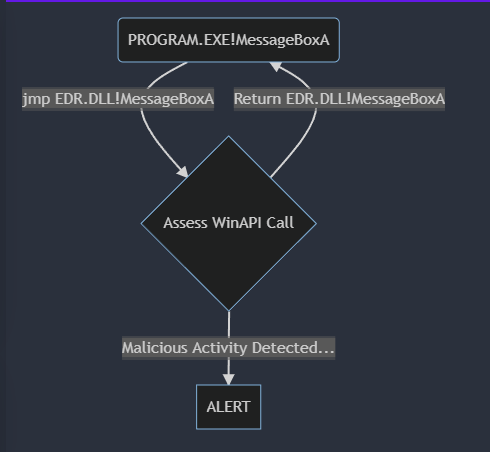
A hook allows for function instrumentation by intercepting WinAPI calls, by placing a jmp instruction in place of the function address. This jmp will redirect the flow of a call. We will take a look at this in action in the following section. By hooking a function call, it gives the author the ability to:
- Assess arguments
- Allowing Execution
- Blocking Execution
This isn't an exhaustive list, but should serve to demonstrate the functionality which we will be coming across most when running our implants.
Examples of this in use are:
- Understanding and Bypassing AMSI: Bypass AMSI by hooking the
AmsiScanBuffercall - RDPThief: Intercept and read credentials from RDP
- Windows API Hooking: Redirect
MessageBoxA - Import Address Table (IAT) Hooking: Redirect
MessageBoxA - Intercepting Logon Credentials by Hooking msv1_0!SpAcceptCredentials: Intercept and read credentials from
msv1_0!SpAcceptCredentials - Protecting the Heap: Encryption & Hooks: Hook RtlAllocateHeap, RtlReAllocateHeap and RtlFreeHeap to monitor heap allocations
- LdrLoadDll Hook: Prevent DLLs being loaded
Hunting ELK
To access our kernel callbacks without having to write all of that intimidating logic from scratch, we will be using the Hunting ELK (HELK):
The Hunting ELK or simply the HELK is one of the first open source hunt platforms with advanced analytics capabilities such as SQL declarative language, graphing, structured streaming, and even machine learning via Jupyter notebooks and Apache Spark over an ELK stack. This project was developed primarily for research, but due to its flexible design and core components, it can be deployed in larger environments with the right configurations and scalable infrastructure.
We also use a script to search through the Sysmon logs:
param (
    [string]$Loader = "",
    [string]$dll = ""
 )

$eventId = 7
$logName = "Microsoft-Windows-Sysmon/Operational"

$Yesterday = (Get-Date).AddHours(-1)
$events = Get-WinEvent -FilterHashtable @{logname=$logName; id=$eventId ;StartTime = $Yesterday;}

foreach($event in $events)
{
    $msg = $event.Message.ToString()
    $image = ($msg|Select-String -Pattern 'Image:.*').Matches.Value.Replace("Image: ", "")
    $imageLoaded = ($msg|Select-String -Pattern 'ImageLoaded:.*').Matches.Value.Replace("ImageLoaded: ", "")
    if($image.ToLower().contains($Loader.ToLower()) -And $imageLoaded.ToLower().Contains($dll.ToLower()))
    {
        Write-Host Image Loaded $imageLoaded
    }
}
Kernel Callbacks
Kernel Callbacks, according to Microsoft:
The kernel's callback mechanism provides a general way for drivers to request and provide notification when certain conditions are satisfied.
Essentially, they allow drivers to receive and handle notifications for specific events. From veil-ivy/block_create_process.cpp, here is an implementation of using the PsSetLoadImageNotifyRoutine Callback to BLOCK process creation:
#include
#define BLOCK_PROCESS "notepad.exe"
static OB_CALLBACK_REGISTRATION obcallback_registration;
static OB_OPERATION_REGISTRATION oboperation_callback;
#define PROCESS_CREATE_THREAD  (0x0002)
#define PROCESS_CREATE_PROCESS (0x0080)
#define PROCESS_TERMINATE      (0x0001)
#define PROCESS_VM_WRITE       (0x0020)
#define PROCESS_VM_READ        (0x0010)
#define PROCESS_VM_OPERATION   (0x0008)
#define PROCESS_SUSPEND_RESUME (0x0800)
static PVOID registry = NULL;
static UNICODE_STRING altitude = RTL_CONSTANT_STRING(L"300000");
//1: kd > dt nt!_EPROCESS ImageFileName
//+ 0x5a8 ImageFileName : [15] UChar
static const unsigned int imagefilename_offset = 0x5a8;
auto drv_unload(PDRIVER_OBJECT DriverObject) {
    UNREFERENCED_PARAMETER(DriverObject);
    ObUnRegisterCallbacks(registry);
}
OB_PREOP_CALLBACK_STATUS
PreOperationCallback(
    _In_ PVOID RegistrationContext,
    _Inout_ POB_PRE_OPERATION_INFORMATION PreInfo
) {
    UNREFERENCED_PARAMETER(RegistrationContext);

    if (strcmp(BLOCK_PROCESS, (char*)PreInfo->Object + imagefilename_offset) == 0) {
        if ((PreInfo->Operation == OB_OPERATION_HANDLE_CREATE))
        {

            if ((PreInfo->Parameters->CreateHandleInformation.OriginalDesiredAccess & PROCESS_TERMINATE) == PROCESS_TERMINATE)
            {
                PreInfo->Parameters->CreateHandleInformation.DesiredAccess &= ~PROCESS_TERMINATE;
            }

            if ((PreInfo->Parameters->CreateHandleInformation.OriginalDesiredAccess & PROCESS_VM_READ) == PROCESS_VM_READ)
            {
                PreInfo->Parameters->CreateHandleInformation.DesiredAccess &= ~PROCESS_VM_READ;
            }

            if ((PreInfo->Parameters->CreateHandleInformation.OriginalDesiredAccess & PROCESS_VM_OPERATION) == PROCESS_VM_OPERATION)
            {
                PreInfo->Parameters->CreateHandleInformation.DesiredAccess &= ~PROCESS_VM_OPERATION;
            }

            if ((PreInfo->Parameters->CreateHandleInformation.OriginalDesiredAccess & PROCESS_VM_WRITE) == PROCESS_VM_WRITE)
            {
                PreInfo->Parameters->CreateHandleInformation.DesiredAccess &= ~PROCESS_VM_WRITE;
            }
        }
    }

    return OB_PREOP_SUCCESS;
}
VOID
PostOperationCallback(
    _In_ PVOID RegistrationContext,
    _In_ POB_POST_OPERATION_INFORMATION PostInfo
)
{
    UNREFERENCED_PARAMETER(RegistrationContext);
    UNREFERENCED_PARAMETER(PostInfo);

}

extern "C" auto DriverEntry(PDRIVER_OBJECT DriverObject, PUNICODE_STRING RegistryPath) -> NTSTATUS {
    UNREFERENCED_PARAMETER(RegistryPath);
    DriverObject->DriverUnload = drv_unload;
    auto status = STATUS_SUCCESS;
    static OB_CALLBACK_REGISTRATION ob_callback_register;
    static OB_OPERATION_REGISTRATION oboperation_registration;
    oboperation_registration.Operations = OB_OPERATION_HANDLE_CREATE;
    oboperation_registration.ObjectType = PsProcessType;
    oboperation_registration.PreOperation = PreOperationCallback;
    oboperation_registration.PostOperation = PostOperationCallback;
    ob_callback_register.Altitude = altitude;
    ob_callback_register.Version = OB_FLT_REGISTRATION_VERSION;
    ob_callback_register.OperationRegistrationCount = 1;
    ob_callback_register.OperationRegistration = &oboperation_registration;
    status = ObRegisterCallbacks(&ob_callback_register, ®istry);
    if (!NT_SUCCESS(status)) {
        DbgPrint("failed to register callback: %x \r\n",status);
    }
    return status;
}
In this instance, ObRegisterCallbacks is being used to block the creation of notepad. An Endpoint Protection solution may not use it in this way, but its very likely this type of callback will be used as telemetry to determine if malicious activity is occurring.
In this section, we are going to discuss PsSetLoadImageNotifyRoutine. This callback is responsible for exactly what it says: Sending a notification when an image is loaded into a process. For an example implementation, see Subscribing to Process Creation, Thread Creation and Image Load Notifications from a Kernel Driver.
Triggering the callback
To understand how PsSetLoadImageNotifyRoutine works, we need to determine what its trigger is.
Assuming the following code:
#include
#include

int main()
{
    HMODULE hModule = LoadLibraryA("winhttp.dll");
    printf("WinHTTP: 0x%p\n", hModule);
    return 0;
}
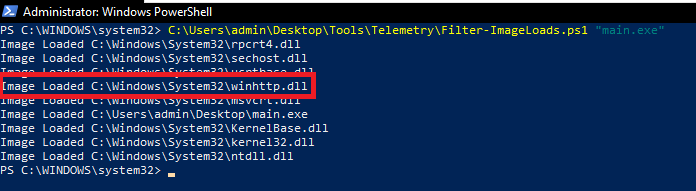
When LoadLibraryA is called, the function registers a callback to notify the driver than this has happened. In order to see this log in HELK, we use the script we mentioned earlier on.
If we filter for main.exe, which is the above code, we can see the winhttp.dll loaded:
In Elastic, we can also use the following KQL:
process_name : "main.exe" and event_id: 7 and ImageLoaded: winhttp.dll
event_original_message holds the whole log:
Image loaded:
RuleName: -
UtcTime: 2022-04-29 18:50:10.780
ProcessGuid: {3ebcda8b-3362-626c-a200-000000004f00}
ProcessId: 6716
Image: C:\Users\admin\Desktop\main.exe
ImageLoaded: C:\Windows\System32\winhttp.dll
FileVersion: 10.0.19041.1620 (WinBuild.160101.0800)
Description: Windows HTTP Services
Product: Microsoft® Windows® Operating System
Company: Microsoft Corporation
OriginalFileName: winhttp.dll
Hashes: SHA1=4F2A9BB575D38DBDC8DBB25A82BDF1AC0C41E78C,MD5=FB2B6347C25118C3AE19E9903C85B451,SHA256=989B2DFD70526098366AB722865C71643181F9DCB8E7954DA643AA4A84F3EBF0,IMPHASH=0597CE736881E784CC576C58367E6FEA
Signed: true
Signature: Microsoft Windows
SignatureStatus: Valid
User: PUNCTURE\admin
To see what this is doing, we can float through the ReactOS source code:
This is good to get some familiarity with how this would work. However, in Bypassing Image Load Kernel Callbacks, by batsec, identifies that the trigger is in NtCreateSection call which is then called in the LdrpCreateDllSection. So, we don't need to spend too much time debugging to find this.
Spoofing Loads
In the article from batsec, they show that the aforementioned events can be spammed with the following code:
#include
#include
#include

#define DLL_TO_FAKE_LOAD L"\\??\\C:\\windows\\system32\\calc.exe"

BOOL FakeImageLoad()
{
    HANDLE hFile;
    SIZE_T stSize = 0;
    NTSTATUS ntStatus = 0;
    UNICODE_STRING objectName;
    HANDLE SectionHandle = NULL;
    PVOID BaseAddress = NULL;
    IO_STATUS_BLOCK IoStatusBlock;
    OBJECT_ATTRIBUTES objectAttributes = { 0 };

    RtlInitUnicodeString(
        &objectName,
        DLL_TO_FAKE_LOAD
    );

    InitializeObjectAttributes(
        &objectAttributes,
        &objectName,
        OBJ_CASE_INSENSITIVE,
        NULL,
        NULL
    );

    ntStatus = NtOpenFile(
        &hFile,
        0x100021,
        &objectAttributes,
        &IoStatusBlock,
        5,
        0x60
    );

    ntStatus = NtCreateSection(
        &SectionHandle,
        0xd,
        NULL,
        NULL,
        0x10,
        SEC_IMAGE,
        hFile
    );

    ntStatus = NtMapViewOfSection(
        SectionHandle,
        (HANDLE)0xFFFFFFFFFFFFFFFF,
        &BaseAddress,
        NULL,
        NULL,
        NULL,
        &stSize,
        0x1,
        0x800000,
        0x80
    );

    NtClose(SectionHandle);
}

int main()
{
    for (INT i = 0; i < 10000; i++)
    {
        FakeImageLoad();
    }

    return 0;
}
The following screenshot is also from that blog post:
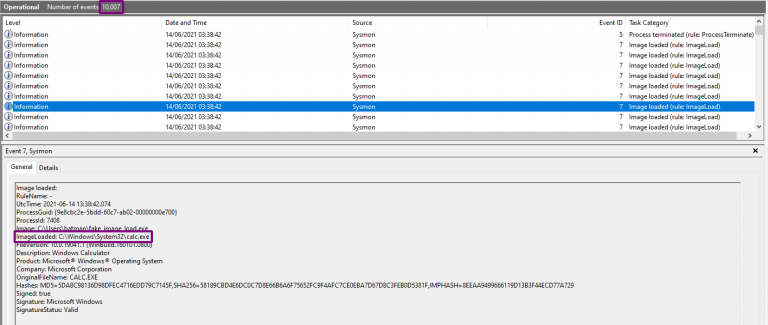
batsec identified that by making the call to NtCreateSection, the event can be spammed whilst not actually loading a DLL. Similarly, the spoof can be somewhat weaponised/manipulated to do other things by updating the LDR_DATA_TABLE_ENTRY struct:
typedef struct _LDR_DATA_TABLE_ENTRY {
    LIST_ENTRY InLoadOrderLinks;
    LIST_ENTRY InMemoryOrderModuleList;
    LIST_ENTRY InInitializationOrderModuleList;
    PVOID DllBase;
    PVOID EntryPoint;
    ULONG SizeOfImage;
    UNICODE_STRING FullDllName;
    UNICODE_STRING BaseDllName;
    ULONG Flags;
    USHORT LoadCount;
    USHORT TlsIndex;
    union {
        LIST_ENTRY HashLinks;
        struct
        {
            PVOID SectionPointer;
            ULONG CheckSum;
        };
    };
    union {
        ULONG TimeDateStamp;
        PVOID LoadedImports;
    };
    PVOID EntryPointActivationContext;
    PVOID PatchInformation;
} LDR_DATA_TABLE_ENTRY, *PLDR_DATA_TABLE_ENTRY;
In this example, we will use CertEnroll.dll for no reason at all:
UNICODE_STRING uFullPath;
UNICODE_STRING uFileName;

WCHAR* dllPath = L"C:\\Windows\\System32\\CertEnroll.dll";
WCHAR* dllName = L"CertEnroll.dll";

RtlInitUnicodeString(&uFullPath, dllPath);
RtlInitUnicodeString(&uFileName, dllName);
Now we just need to step through the struct and fill out the required information.
Load Time:
status = NtQuerySystemTime(&pLdrEntry2->LoadTime);
Load Reason (LDR_DLL_LOAD_REASON):
pLdrEntry2->LoadReason = LoadReasonDynamicLoad;
Because the Loader needs a module base address, we'll just load shellcode for CALC.EXE here (we'll discuss this part more afterwards):
SIZE_T bufSz = sizeof(buf);
LPVOID pAddress = VirtualAllocEx(hProcess, 0, bufSz, MEM_COMMIT | MEM_RESERVE, PAGE_READWRITE);
memcpy(pAddress, buf, sizeof(buf));
Hashed Base Name (RtlHashUnicodeString):
pLdrEntry2->BaseNameHashValue = UnicodeToHash(uFileName, FALSE);
Fill out the rest of the struct:
pLdrEntry2->ImageDll = TRUE;
pLdrEntry2->LoadNotificationsSent = TRUE;
pLdrEntry2->EntryProcessed = TRUE;
pLdrEntry2->InLegacyLists = TRUE;
pLdrEntry2->InIndexes = TRUE;
pLdrEntry2->ProcessAttachCalled = TRUE;
pLdrEntry2->InExceptionTable = FALSE;
pLdrEntry2->OriginalBase = (ULONG_PTR)pAddress;
pLdrEntry2->DllBase = pAddress;
pLdrEntry2->SizeOfImage = 6969;
pLdrEntry2->TimeDateStamp = 0;
pLdrEntry2->BaseDllName = uFileName;
pLdrEntry2->FullDllName = uFullPath;
pLdrEntry2->ObsoleteLoadCount = 1;
pLdrEntry2->Flags = LDRP_IMAGE_DLL | LDRP_ENTRY_INSERTED | LDRP_ENTRY_PROCESSED | LDRP_PROCESS_ATTACH_CALLED;
Complete the DdagNode struct:
pLdrEntry2->DdagNode = (PLDR_DDAG_NODE)HeapAlloc(GetProcessHeap(), HEAP_ZERO_MEMORY, sizeof(LDR_DDAG_NODE));
if (!pLdrEntry2->DdagNode)
{
    return -1;
}

pLdrEntry2->NodeModuleLink.Flink = &pLdrEntry2->DdagNode->Modules;
pLdrEntry2->NodeModuleLink.Blink = &pLdrEntry2->DdagNode->Modules;
pLdrEntry2->DdagNode->Modules.Flink = &pLdrEntry2->NodeModuleLink;
pLdrEntry2->DdagNode->Modules.Blink = &pLdrEntry2->NodeModuleLink;
pLdrEntry2->DdagNode->State = LdrModulesReadyToRun;
pLdrEntry2->DdagNode->LoadCount = 1;
Here is it in action:
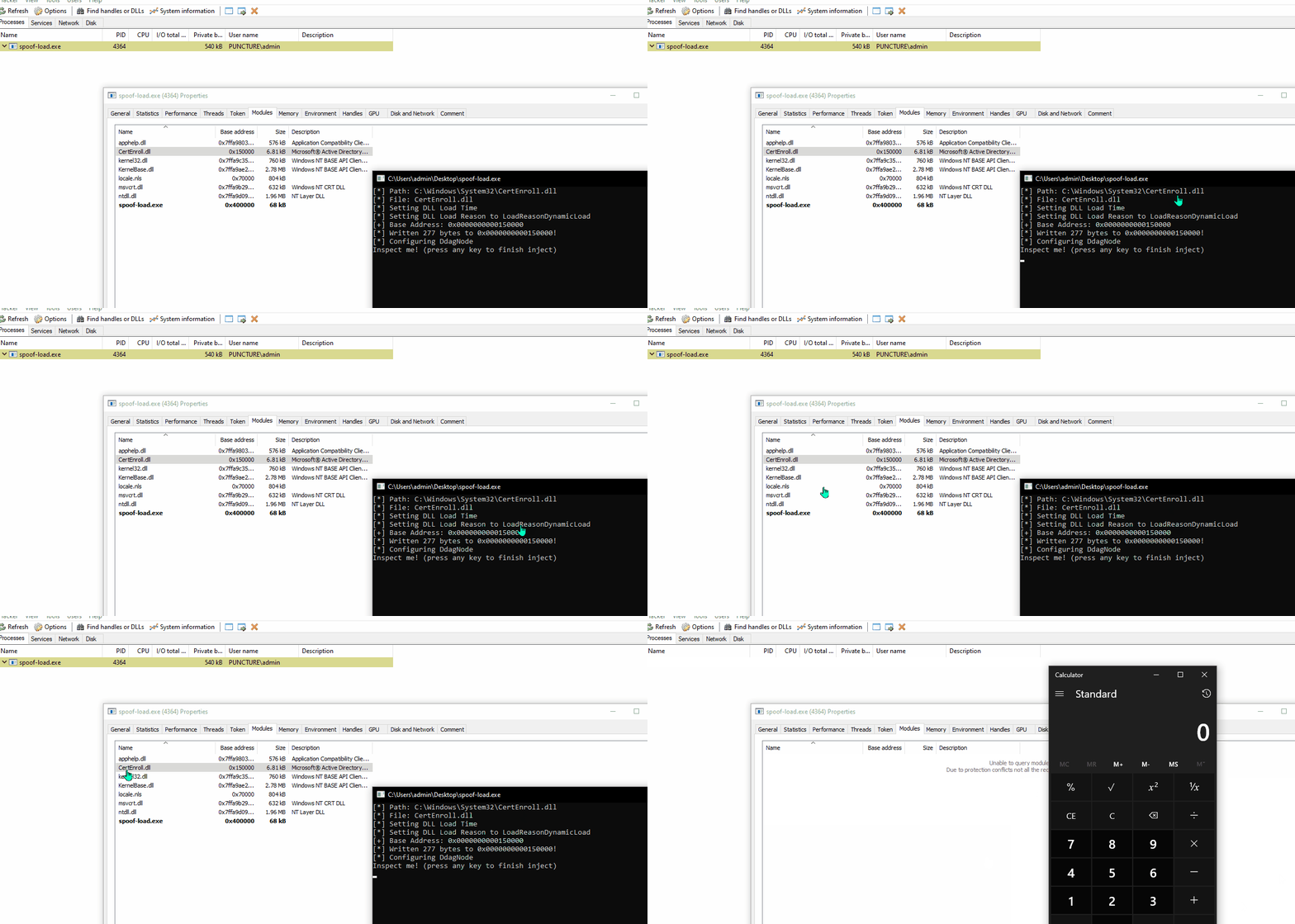
In the above, CertEnroll.dll can be seen loaded in the spoof-load.exe process. Remember, this is not loaded. The only thing that happened here is that a string for that DLL was passed in. We then told the loader than the base address of the DLL is that of the shellcode:
Looking at this technique, there are two obvious use cases:
- Tie the implant base address (C2IMPLANT.REFLECTIVE.DLL) to a legitimate DLL (ADVAP32.DLL) causing it to appear less suspicious
- Remove an IOC Library (WinHTTP.DLL) by loading ADVAPI32.DLL but pointing it to a WinHTTP.DLL base address.
Bypassing the Callback
We aren't going to reinvent the wheel here, its explained wonderfully in Bypassing Image Load Kernel Callbacks. Essentially, to cause the callback to not trigger, a full loader needs to be rewritten. The conclusion to that research was DarkLoadLibrary:
In essence,
DarkLoadLibraryis an implementation ofLoadLibrarythat will not trigger image load events. It also has a ton of extra features that will make life easier during malware development.
A proof-of-concept usage of this library was taken from DLL Shenanigans.
Let's inspect it:
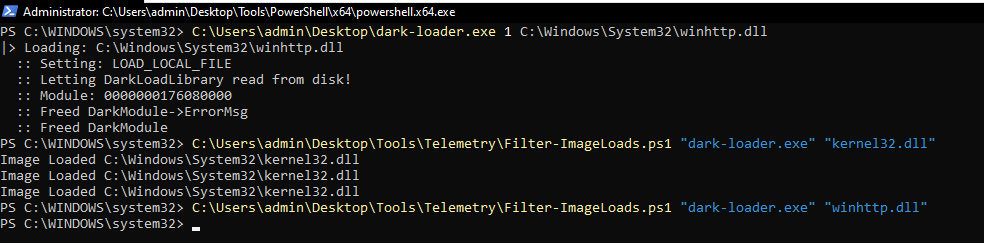
Then the above 3 commands are ran:
dark-loaderuses theLOAD_LOCAL_FILEflag to load a disk from disk, asLoadLibraryAdoes.- The Image Load logs are searched for Kernel32 to make sure logs were found.
- winhttp.dll was searched, and nothing returned
To avoid the call to NtCreateSection which was identified to be registering the callback, the section mapping is done with NtAllocateVirtualMemory or VirtualAlloc, as seen in MapSections().
Hooking Example
Lets look at two examples before looking into some libraries - Manual Hooks in x86 and NtSetProcessInformation Callbacks.
Manual Hooks (x86)
Using Windows API Hooking as a x86 example (easier to demonstrate), we can adapt the code to look something like this:
#include
#include c

#define BYTES_REQUIRED 6

int __stdcall HookedMessageBoxA(HWND hWnd, LPCSTR lpText, LPCSTR lpCaption, UINT uType)
{
    printf("\n[ HOOKED MESSAGEBOXA ]\n");
    printf("-> Arguments:\n");
    printf("  1. lpText: %s\n", lpText);
    printf("  2. lpCaption: %s\n", lpCaption);
    printf("  3. uType: %ld\n", uType);
    return 1;
}

void PrintHexA(char* data, int sz)
{
    printf("  -> ");
    for (int i = 0; i < sz; i++)
    {
        printf("\\x%02hhX", data[i]);
    }

    printf("\n");
}

int main()
{

    SIZE_T lpNumberOfBytesRead = 0;
    HMODULE hModule = nullptr;
    FARPROC pMessageBoxAFunc = nullptr;
    char pMessageBoxABytes[BYTES_REQUIRED] = {};

    void* pHookedMessageBoxFunc = &HookedMessageBoxA;

    hModule = LoadLibraryA("user32.dll");
    if (!hModule)
    {
        return -1;
    }

    pMessageBoxAFunc = GetProcAddress(hModule, "MessageBoxA");

    printf("-> Original MessageBoxA: 0x%p\n", pMessageBoxAFunc);

    if (ReadProcessMemory(GetCurrentProcess(), pMessageBoxAFunc, pMessageBoxABytes, BYTES_REQUIRED, &lpNumberOfBytesRead) == FALSE)
    {
        printf("[!] ReadProcessMemory: %ld\n", GetLastError());
        return -1;
    }

    printf("-> MessageBoxA Hex:\n");

    PrintHexA(pMessageBoxABytes, BYTES_REQUIRED);

    printf("-> Hooked MessageBoxA: 0x%p\n", pHookedMessageBoxFunc);

    char patch[BYTES_REQUIRED] = { 0 };
    memcpy_s(patch, 1, "\x68", 1);
    memcpy_s(patch + 1, 4, &pHookedMessageBoxFunc, 4);
    memcpy_s(patch + 5, 1, "\xC3", 1);

    printf("-> Patch Hex:\n");
    PrintHexA(patch, BYTES_REQUIRED);

    if (WriteProcessMemory(GetCurrentProcess(), (LPVOID)pMessageBoxAFunc, patch, sizeof(patch), &lpNumberOfBytesRead) == FALSE)
    {
        printf("[!] WriteProcessMemory: %ld\n", GetLastError());
        return -1;
    }

    MessageBoxA(NULL, "AAAAA", "BBBBB", MB_OK);

    return 0;
}
Bypassing Userland Hooks
Back in 2019 Cneelis published Red Team Tactics: Combining Direct System Calls and sRDI to bypass AV/EDR which had a subsequent release of SysWhispers:
SysWhispers provides red teamers the ability to generate header/ASM pairs for any system call in the core kernel image (ntoskrnl.exe). The headers will also include the necessary type definitions.
Then modexp provided an update which corrected a shortcoming with version 1 and gave us SysWhispers2:
The specific implementation in SysWhispers2 is a variation of @modexpblog's code. One difference is that the function name hashes are randomized on each generation. @ElephantSe4l, who had published this technique earlier, has another implementation based in C++17 which is also worth checking out.
The main change is the introduction of base.c which is a result of Bypassing User-Mode Hooks and Direct Invocation of System Calls for Red Teams.
And again, KlezVirus produced SysWhispers3:
The usage is pretty similar to SysWhispers2, with the following exceptions:
- It also supports x86/WoW64
- It supports syscalls instruction replacement with an EGG (to be dynamically replaced)
- It supports direct jumps to syscalls in x86/x64 mode (in WOW64 it's almost standard)
- It supports direct jumps to random syscalls (borrowing @ElephantSeal's idea)
A better explanation of these features are better outlined in the blog post SysWhispers is dead, long live SysWhispers!
This is just one suite of SysCall techniques, there's a whole other technique based on Heavens Gate. See Gatekeeping Syscalls for a breakdown on these different techniques.
EVEN THEN! There are more:
RECAP!
With the ability to transition into Kernel-Mode, we have the ability to go unseen by the User-land hooks. So, lets build something.
For our example, we are going to use MinHook:
The Minimalistic x86/x64 API Hooking Library for Windows
The DLL
So, this is going to be a DLL which gets loaded into a process and then hooks functionality and makes some decision based on its behaviour. Here is DllMain:
BOOL APIENTRY DllMain(HINSTANCE hInst, DWORD reason, LPVOID reserved)
{
    switch (reason)
    {
    case DLL_PROCESS_ATTACH:
    {
        HANDLE hThread = CreateThread(nullptr, 0, SetupHooks, nullptr, 0, nullptr);
        if (hThread != nullptr) {
            CloseHandle(hThread);
        }
        break;
    }
    case DLL_PROCESS_DETACH:

        break;
    }
    return TRUE;
}
When a DLL_PROCESS_ATTACH is the load reason, then we create a new thread and point it at our "main" function. This is where we initialise minhook, and set up some hooks:
DWORD WINAPI SetupHooks(LPVOID param)
{
    MH_STATUS status;

    if (MH_Initialize() != MH_OK) {
        return -1;
    }

    status = MH_CreateHookApi(
        L"ntdll",
        "NtAllocateVirtualMemory",
        NtAllocateVirtualMemory_Hook,
        reinterpret_cast(&pNtAllocateVirtualMemory_Original)
    );

    status = MH_CreateHookApi(
        L"ntdll",
        "NtProtectVirtualMemory",
        NtProtectVirtualMemory_Hook,
        reinterpret_cast(&pNtProtectVirtualMemory_Original)
    );

    status = MH_CreateHookApi(
        L"ntdll",
        "NtWriteVirtualMemory",
        NtWriteVirtualMemory_Hook,
        reinterpret_cast(&pNtWriteVirtualMemory_Original)
    );

    status = MH_EnableHook(MH_ALL_HOOKS);

    return status;
}
MH_Initialize() is a mandatory call, so we start with that. Next, we create 3 hooks:
NtAllocateVirtualMemoryNtProtectVirtualMemoryNtWriteVirtualMemory
Hooks are created with the MH_CreateHookApi() call:
MH_STATUS WINAPI MH_CreateHookApi(LPCWSTR pszModule, LPCSTR pszProcName, LPVOID pDetour, LPVOID *ppOriginal);
To create a hook, 4 things are needed:
- Module Name
- Function Name
- Function to "replace" the desired function
- Somewhere to store the original function address
Below is an example:
MH_STATUS status = MH_CreateHookApi(
    L"ntdll",
    "NtAllocateVirtualMemory",
    NtAllocateVirtualMemory_Hook,
    reinterpret_cast(&pNtAllocateVirtualMemory_Original)
);
NtAllocateVirtualMemory_Hook() is the function used to replace the original function:
NTSTATUS NTAPI NtAllocateVirtualMemory_Hook(IN HANDLE ProcessHandle, IN OUT PVOID* BaseAddress, IN ULONG_PTR ZeroBits, IN OUT PSIZE_T RegionSize, IN ULONG AllocationType, IN ULONG Protect)
{
    if (Protect == PAGE_EXECUTE_READWRITE)
    {
        printf("[INTERCEPTOR]: RWX Allocation Detected in %ld (0x%p)\n", GetProcessId(ProcessHandle), ProcessHandle);
        if (BLOCKING)
        {
            return 5;
        }
        else
        {
            return pNtAllocateVirtualMemory_Original(ProcessHandle, BaseAddress, ZeroBits, RegionSize, AllocationType, Protect);
        }
    }
    else
    {
        return pNtAllocateVirtualMemory_Original(ProcessHandle, BaseAddress, ZeroBits, RegionSize, AllocationType, Protect);
    }
}
The function is declared exactly the same as typedef for the function:
typedef NTSTATUS(NTAPI* _NtAllocateVirtualMemory)(IN HANDLE ProcessHandle, IN OUT PVOID* BaseAddress, IN ULONG_PTR ZeroBits, IN OUT PSIZE_T RegionSize, IN ULONG AllocationType, IN ULONG Protect);
This is so that there are no issues with typing between hooks.
In the NtAllocateVirtualMemory_Hook function, the only thing we are checking here is if the protection type is PAGE_EXECUTE_READWRITE, RWX, because this is commonly a sign of malicious activity (COMMONLY). If it matches, we just print that we found something.
Then, we have a concept of blocking. This simply means that if BLOCKING is true, then it returns. If its false, then we return the pointer to the original function, allowing the function to execute as the user expects.
In NtProtectVirtualMemory, we just check for changes to PAGE_EXECUTE_READ as this is the common protection type to avoid RWX allocations:
NTSTATUS NTAPI NtProtectVirtualMemory_Hook(IN HANDLE ProcessHandle, IN OUT PVOID* BaseAddress, IN OUT PULONG NumberOfBytesToProtect, IN ULONG NewAccessProtection, OUT PULONG OldAccessProtection) {

    if (NewAccessProtection == PAGE_EXECUTE_READ) {
        printf("[INTERCEPTOR]: Detected move to RX in %ld (0x%p)\n", GetProcessId(ProcessHandle), ProcessHandle);
        if (BLOCKING)
        {
            return 5;
        }
        else
        {
            return pNtProtectVirtualMemory_Original(ProcessHandle, BaseAddress, NumberOfBytesToProtect, NewAccessProtection, OldAccessProtection);
        }
    }
    else
    {
        return pNtProtectVirtualMemory_Original(ProcessHandle, BaseAddress, NumberOfBytesToProtect, NewAccessProtection, OldAccessProtection);
    }
}
In NtWriteVirtualMemory, no additional checks are made:
NTSTATUS NTAPI NtWriteVirtualMemory_Hook(IN HANDLE ProcessHandle, IN PVOID BaseAddress, IN PVOID Buffer, IN SIZE_T NumberOfBytesToWrite, OUT PSIZE_T NumberOfBytesWritten OPTIONAL)
{
    printf("[INTERCEPTOR]: Detected write of %I64u in %ld (0x%p)\n", NumberOfBytesToWrite, GetProcessId(ProcessHandle), ProcessHandle);
    if (BLOCKING)
    {
        return 5;
    }
    else
    {
        return pNtWriteVirtualMemory_Original(ProcessHandle, BaseAddress, Buffer, NumberOfBytesToWrite, NumberOfBytesWritten);
    }
}
The Loader
In this instance, we have a PE which just calls LoadLibraryA on the DLL, and then runs a fake injection:
#include
#include

int main()
{
    HMODULE hModule = LoadLibraryA("Interceptor.dll");

    if (hModule == nullptr)
    {
        printf("[LOADER] [LOADER] Failed to load: %ld\n", GetLastError());
        return -1;
    }
    printf("[LOADER] Interceptor.dll: 0x%p\n", hModule);

    Sleep(3000);

    CHAR buf[8] = { 0x00, 0x00, 0x00, 0x00, 0x00, 0x00, 0x00, 0x00 };

    LPVOID pAddress = VirtualAlloc(nullptr, 8, MEM_COMMIT | MEM_RESERVE, PAGE_EXECUTE_READWRITE);
    if (pAddress == nullptr)
    {
        printf("[LOADER] VirtualAlloc: %ld\n", GetLastError());
        return -1;
    }
    printf("[LOADER] Base: 0x%p\n", pAddress);

    if (WriteProcessMemory((HANDLE)-1, pAddress, buf, sizeof buf, nullptr) == FALSE)
    {
        printf("[LOADER] WriteProcessMemory: %ld\n", GetLastError());
        return -1;
    }
    printf("[LOADER] Wrote!\n");

    if (VirtualProtect(pAddress, sizeof buf, PAGE_EXECUTE_READ, nullptr) == FALSE)
    {
        printf("[LOADER] VirtualProtect: %ld\n", GetLastError());
        return -1;
    }
    printf("[LOADER] Protected!\n");

    return 0;
}
Detecting Functionality
To see what this is doing, we can use SymInitialize to get the function names:
int main()
{
    SymSetOptions(SYMOPT_UNDNAME);
    SymInitialize(GetCurrentProcess(), NULL, TRUE);

    SetInstrumentationCallback();

    return 0;
}
Running this completed example, we can now see all of the function names and return codes:
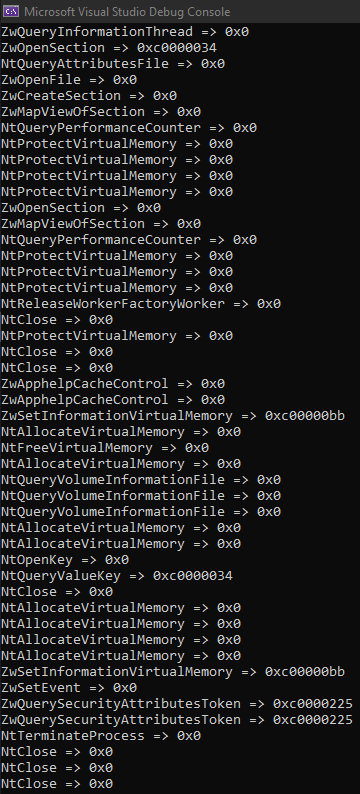
One final mention for this technique is that it can be used to enumerate the the System Service Number (SSN) for a given function call. This was documented by Paranoid Ninja in EtwTi-Syscall-Hook and Release v0.8 - Warfare Tactics, where the hook is significantly smaller (at the cost of doing far less):
VOID HuntSyscall(ULONG_PTR ReturnAddress, ULONG_PTR retSyscallPtr) {
    PVOID ImageBase = ((EtwPPEB)(((_EtwPTEB)(NtCurrentTeb()->ProcessEnvironmentBlock))))->ImageBaseAddress;
    PIMAGE_NT_HEADERS NtHeaders = RtlImageNtHeader(ImageBase);
    if (ReturnAddress >= (ULONG_PTR)ImageBase && ReturnAddress < (ULONG_PTR)ImageBase + NtHeaders->OptionalHeader.SizeOfImage) {
        printf("[+] Syscall detected:  Return address: 0x%X  Syscall value: 0x%X\n", ReturnAddress, retSyscallPtr);
    }
}
And its companion assembly:
section .text

extern HuntSyscall
global hookedCallback

hookedCallback:
    push rcx
    push rdx
    mov rdx, [r10-0x10]
    call HuntSyscall
    pop rdx
    pop rcx
    ret
Bypassing Userland Hooks
Back in 2019 Cneelis published Red Team Tactics: Combining Direct System Calls and sRDI to bypass AV/EDR which had a subsequent release of SysWhispers:
SysWhispers provides red teamers the ability to generate header/ASM pairs for any system call in the core kernel image (ntoskrnl.exe). The headers will also include the necessary type definitions.
Then modexp provided an update which corrected a shortcoming with version 1 and gave us SysWhispers2:
The specific implementation in SysWhispers2 is a variation of @modexpblog’s code. One difference is that the function name hashes are randomized on each generation. @ElephantSe4l, who had published this technique earlier, has another implementation based in C++17 which is also worth checking out.
The main change is the introduction of base.c which is a result of Bypassing User-Mode Hooks and Direct Invocation of System Calls for Red Teams.
And again, KlezVirus produced SysWhispers3:
The usage is pretty similar to SysWhispers2, with the following exceptions:
- It also supports x86/WoW64
- It supports syscalls instruction replacement with an EGG (to be dynamically replaced)
- It supports direct jumps to syscalls in x86/x64 mode (in WOW64 it's almost standard)
- It supports direct jumps to random syscalls (borrowing @ElephantSeal's idea)
A better explanation of these features are better outlined in the blog post SysWhispers is dead, long live SysWhispers!
This is just one suite of SysCall techniques, there's a whole other technique based on Heavens Gate.
See Gatekeeping Syscalls for a breakdown on these different techniques.
EVEN THEN! There are more:
RECAP!
With the ability to transition into Kernel-Mode, we have the ability to go unseen by the User-land hooks. So, let's build something.
For our example, we are going to use MinHook:
The Minimalistic x86/x64 API Hooking Library for Windows
The DLL
So, this is going to be a DLL which gets loaded into a process and then hooks functionality and makes some decision based on its behaviour. Here is DllMain:
BOOL APIENTRY DllMain(HINSTANCE hInst, DWORD reason, LPVOID reserved)
{
    switch (reason)
    {
    case DLL_PROCESS_ATTACH:
    {
        HANDLE hThread = CreateThread(nullptr, 0, SetupHooks, nullptr, 0, nullptr);
        if (hThread != nullptr) {
            CloseHandle(hThread);
        }
        break;
    }
    case DLL_PROCESS_DETACH:
        break;
    }
    return TRUE;
}
When a DLL_PROCESS_ATTACH is the load reason, then we create a new thread and point it at our "main" function. This is where we initialise minhook, and set up some hooks:
DWORD WINAPI SetupHooks(LPVOID param)
{
    MH_STATUS status;

    if (MH_Initialize() != MH_OK) {
        return -1;
    }

    status = MH_CreateHookApi(
        L"ntdll",
        "NtAllocateVirtualMemory",
        NtAllocateVirtualMemory_Hook,
        reinterpret_cast<LPVOID*>(&pNtAllocateVirtualMemory_Original)
    );

    status = MH_CreateHookApi(
        L"ntdll",
        "NtProtectVirtualMemory",
        NtProtectVirtualMemory_Hook,
        reinterpret_cast<LPVOID*>(&pNtProtectVirtualMemory_Original)
    );

    status = MH_CreateHookApi(
        L"ntdll",
        "NtWriteVirtualMemory",
        NtWriteVirtualMemory_Hook,
        reinterpret_cast<LPVOID*>(&pNtWriteVirtualMemory_Original)
    );

    status = MH_EnableHook(MH_ALL_HOOKS);

    return status;
}
MH_Initialize() is a mandatory call, so we start with that. Next, we create 3 hooks:
- NtAllocateVirtualMemory
- NtProtectVirtualMemory
- NtWriteVirtualMemory
Hooks are created with the MH_CreateHookApi() call:
MH_STATUS WINAPI MH_CreateHookApi(LPCWSTR pszModule, LPCSTR pszProcName, LPVOID pDetour, LPVOID *ppOriginal);To create a hook, 4 things are needed:
- Module Name
- Function Name
- Function to "replace" the desired function
- Somewhere to store the original function address
Below is an example:
MH_STATUS status = MH_CreateHookApi(
    L"ntdll",
    "NtAllocateVirtualMemory",
    NtAllocateVirtualMemory_Hook,
    reinterpret_cast<LPVOID*>(&pNtAllocateVirtualMemory_Original)
);
NtAllocateVirtualMemory_Hook() is the function used to replace the original function:
NTSTATUS NTAPI NtAllocateVirtualMemory_Hook(IN HANDLE ProcessHandle, IN OUT PVOID* BaseAddress, IN ULONG_PTR ZeroBits, IN OUT PSIZE_T RegionSize, IN ULONG AllocationType, IN ULONG Protect)
{
    if (Protect == PAGE_EXECUTE_READWRITE)
    {
        printf("[INTERCEPTOR]: RWX Allocation Detected in %ld (0x%p)\n", GetProcessId(ProcessHandle), ProcessHandle);
        if (BLOCKING)
        {
            return 5;
        }
        else
        {
            return pNtAllocateVirtualMemory_Original(ProcessHandle, BaseAddress, ZeroBits, RegionSize, AllocationType, Protect);
        }
    }
    else
    {
        return pNtAllocateVirtualMemory_Original(ProcessHandle, BaseAddress, ZeroBits, RegionSize, AllocationType, Protect);
    }
}
The function is declared exactly the same as typedef for the function:
typedef NTSTATUS(NTAPI* _NtAllocateVirtualMemory)(IN HANDLE ProcessHandle, IN OUT PVOID* BaseAddress, IN ULONG_PTR ZeroBits, IN OUT PSIZE_T RegionSize, IN ULONG AllocationType, IN ULONG Protect);This is so that there are no issues with typing between hooks.
In the NtAllocateVirtualMemory_Hook function, the only thing we are checking here is if the protection type is PAGE_EXECUTE_READWRITE, RWX, because this is commonly a sign of malicious activity. If it matches, we just print that we found something.
Then, we have a concept of blocking. This simply means that if BLOCKING is true, then it returns. If it's false, then we return the pointer to the original function, allowing the function to execute as expected.
In NtProtectVirtualMemory, we just check for changes to PAGE_EXECUTE_READ:
NTSTATUS NTAPI NtProtectVirtualMemory_Hook(IN HANDLE ProcessHandle, IN OUT PVOID* BaseAddress, IN OUT PULONG NumberOfBytesToProtect, IN ULONG NewAccessProtection, OUT PULONG OldAccessProtection) {
    if (NewAccessProtection == PAGE_EXECUTE_READ) {
        printf("[INTERCEPTOR]: Detected move to RX in %ld (0x%p)\n", GetProcessId(ProcessHandle), ProcessHandle);
        if (BLOCKING)
        {
            return 5;
        }
        else
        {
            return pNtProtectVirtualMemory_Original(ProcessHandle, BaseAddress, NumberOfBytesToProtect, NewAccessProtection, OldAccessProtection);
        }
    }
    else
    {
        return pNtProtectVirtualMemory_Original(ProcessHandle, BaseAddress, NumberOfBytesToProtect, NewAccessProtection, OldAccessProtection);
    }
}
In NtWriteVirtualMemory, no additional checks are made:
NTSTATUS NTAPI NtWriteVirtualMemory_Hook(IN HANDLE ProcessHandle, IN PVOID BaseAddress, IN PVOID Buffer, IN SIZE_T NumberOfBytesToWrite, OUT PSIZE_T NumberOfBytesWritten OPTIONAL)
{
    printf("[INTERCEPTOR]: Detected write of %I64u in %ld (0x%p)\n", NumberOfBytesToWrite, GetProcessId(ProcessHandle), ProcessHandle);
    if (BLOCKING)
    {
        return 5;
    }
    else
    {
        return pNtWriteVirtualMemory_Original(ProcessHandle, BaseAddress, Buffer, NumberOfBytesToWrite, NumberOfBytesWritten);
    }
}
The Loader
In this instance, we have a PE which just calls LoadLibraryA on the DLL, and then runs a fake injection:
#include <Windows.h>
#include <stdio.h>

int main()
{
    HMODULE hModule = LoadLibraryA("Interceptor.dll");

    if (hModule == nullptr)
    {
        printf("[LOADER] Failed to load: %ld\n", GetLastError());
        return -1;
    }
    printf("[LOADER] Interceptor.dll: 0x%p\n", hModule);

    Sleep(3000);

    CHAR buf[8] = { 0x00 };

    LPVOID pAddress = VirtualAlloc(nullptr, 8, MEM_COMMIT | MEM_RESERVE, PAGE_EXECUTE_READWRITE);
    if (pAddress == nullptr)
    {
        printf("[LOADER] VirtualAlloc: %ld\n", GetLastError());
        return -1;
    }
    printf("[LOADER] Base: 0x%p\n", pAddress);

    if (WriteProcessMemory((HANDLE)-1, pAddress, buf, sizeof buf, nullptr) == FALSE)
    {
        printf("[LOADER] WriteProcessMemory: %ld\n", GetLastError());
        return -1;
    }
    printf("[LOADER] Wrote!\n");

    if (VirtualProtect(pAddress, sizeof buf, PAGE_EXECUTE_READ, nullptr) == FALSE)
    {
        printf("[LOADER] VirtualProtect: %ld\n", GetLastError());
        return -1;
    }
}